🚧 Beta — Rewynd has limited capacity while we scale, so spots are first-come and the bot may be full at peak times. We're actively improving it.
⏪ Instant replay for Discord voice

Never miss the moment.

Rewynd quietly buffers your voice channel so you can save the last few seconds the instant something's funny — with one tap, a reaction, /clip, or just by saying "Rewynd, clip that" out loud — then turn it into a shareable captioned video. Plus a soundboard, TTS, effects and more.

Recorded live on a real server: say the phrase, trim it, share it as a video.

Everything your server needs

One bot for clipping, sounds, and voice fun.

⏪

One-tap instant replay

Pin a panel of ⏪ Clip 10s / 30s / max buttons, or a card per person with their avatar, and clip with a single tap. React ⏪ on the recording notice for the same thing. /clip still works for fine control: how far back, which people, mixed or multitrack.

🎙️

Clip by voice, hands-free

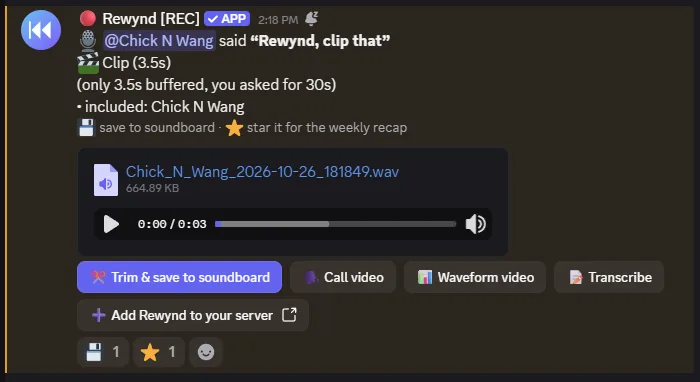
Mid-game, controller in hand? Just say "Rewynd, clip that" and the last few seconds are posted, attributed to you, with the words you just said trimmed off the end. A short chime in the channel confirms it heard you. The phrase is spotted on our server by a small offline model: nothing is transcribed, nothing is stored, and admins can switch it off.

🎬

Shareable clip videos

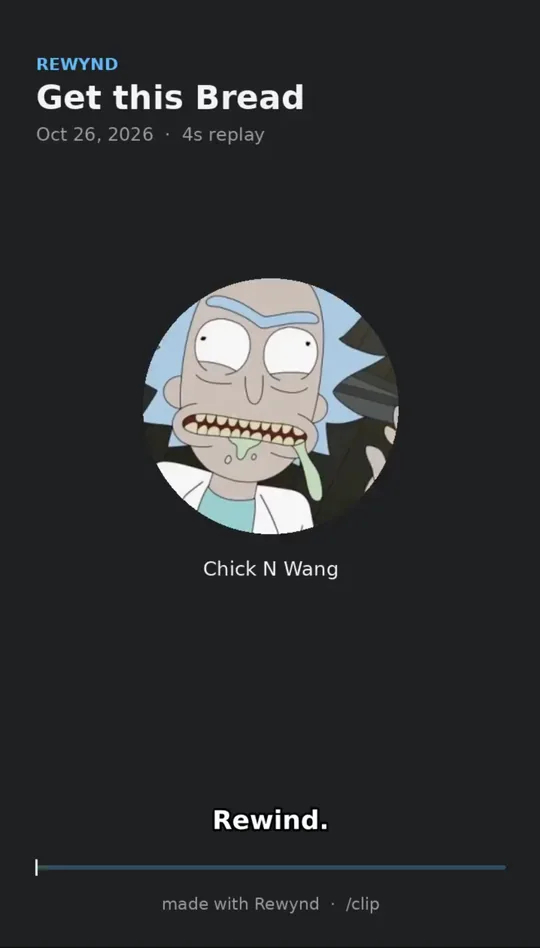
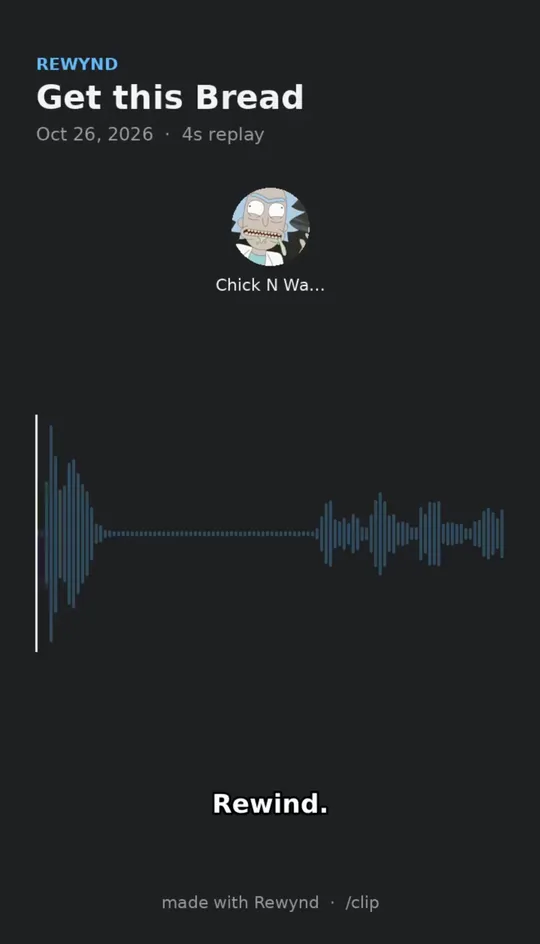
Hit Video on any clip to get a vertical MP4 with speaker avatars, an animated waveform and burned-in captions — ready for TikTok, Shorts or the group chat.

✂️

Trim & keep the good ones

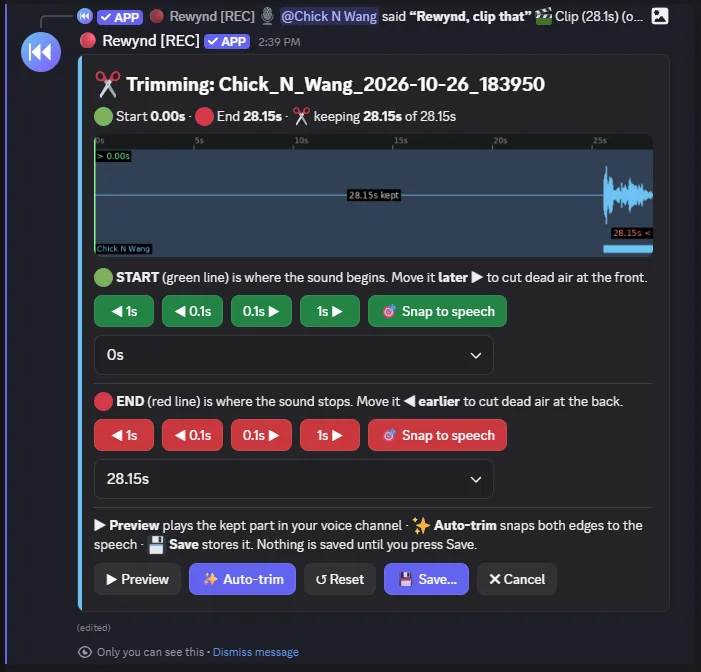
Trim any clip on a live waveform, preview it, and save it to the soundboard — or just react 💾 on the clip. React ⭐ to nominate it for the weekly recap.

🎛️

Soundboard

One-tap buttons for your favorite sounds, a random button for chaos, and an effect picker that remixes any sound on the fly.

📥

Import & grab sounds

Pull your server's Discord soundboard into Rewynd in one go (and keep the sounds even if boosts lapse), or /grab any sound you just played — from any server, or Discord's built-ins.

🎚️

Effects & remix

Nightcore, slowed + reverb, chipmunk, deep, reverse, bass boost, robot, muffled — on any sound, saved or live.

🗣️

Text-to-speech

/say makes Rewynd speak in voice with natural neural voices.

🎺

Entrance sounds

Give everyone walk-up music that plays when they join the channel.

🏆

Leaderboards & weekly recap

Top sounds, top players, and /yap for who talks the most. Every Sunday Rewynd posts your server's recap: clips, plays, most talkative, and the clip of the week.

🌎

Speaks your language

Replies follow each person's Discord language — English, Español and Português today — or pick one with /language.

🛡️

Built for admins

You're in control: restrict commands to roles, set a clip channel, opt in to auto-join, and report or remove sounds.

A clip posted after someone said Rewynd, clip that

Say it, and it's clipped

Something funny just happened? Say "Rewynd, clip that". A chime confirms it heard you, and the last few seconds land in your clip channel with your name on it, the spoken command already cut off the end.

The trim editor: waveform with start and end controls, snap to speech, auto-trim, preview and save

Keep the good part

Hit Trim on any clip. Snap the edges to where the talking starts and stops, or press Auto-trim to cut the dead air, preview it, and save it to the soundboard.

Why not just use Discord's built-in?

Discord's native Clips and Soundboard are a nice start. Rewynd goes further.

 Discord built-inRewynd
Clip any voice chat, anytimeOnly while someone's streamingAlways
Works without NitroClips need Nitro / early accessYes
Works on mobileClips are desktop-onlyYes
Pick which people are in the clipNoYes
One-tap clip buttons & reactionsNoPinned panels, ⏪ reaction
Clip by voice, hands-freeNoSay "Rewynd, clip that"
Share clips as captioned vertical videoNoYes, one button
Visual trim & save clips to soundboardNoYes
Soundboard sizeLimited by server boost levelBig, flexible library
Keep sounds if boosts lapseSounds become unavailableImport them into Rewynd
Effects, TTS & entrance soundsNoYes
Admin role controls & moderationBasicPer-command roles, reporting
Call-style clip video: the speaker's avatar lights up as they talk, with captions Waveform-style clip video with captions

Share it as a video

One button turns a clip into a captioned vertical video, in the call look where each person's avatar lights up as they talk, or with an animated waveform. Ready for TikTok, Shorts, or the group chat.

🔒 We never keep recordings

Rewynd keeps no recording archive. Captured voice lives in a rolling buffer in memory only for a few seconds. It's never written to disk, never logged, never sent anywhere, then it's discarded. Clips you make go straight to your channel; we keep no copy. We never passively save what people say, so there's no recording history for anyone, including us, to go back and listen to.

The only audio we store is what someone deliberately saves to the soundboard, including a clip you choose to keep. Those files are encrypted at rest (AES-256-GCM), listed in /sounds, and removable anytime with /deletedata. Recording is always disclosed with a notice and a [REC] badge.

If you choose to transcribe a sound or clip, or make a captioned video, that audio is sent to our transcription provider to generate the text; nothing else ever leaves Rewynd. The video goes to your channel and we keep no copy. See the Privacy Policy for details.

🎉 Now in beta — capacity is limited

Rewynd is in beta. Because live voice is demanding, we cap how many servers can record at once to keep audio quality high — so during busy times the bot may be at capacity and ask you to try again shortly. We're adding capacity as we grow.

Beta limits per server: a 30-second clip buffer and up to 30 saved sounds, plus the full soundboard, clip videos, TTS, and effects. Auto-join is off until an admin opts in (asked during setup, or /settings autojoin later) and only kicks in once two or more people are in voice. Limits and features may change as we scale. Thanks for helping us test! Questions or issues? Join the support server.